Features
Every Part of Your Business, In One System.
From the purchase order you raise with a vendor to the repair ticket you close for a walk-in customer — here is what Moris actually does, module by module.
Business management
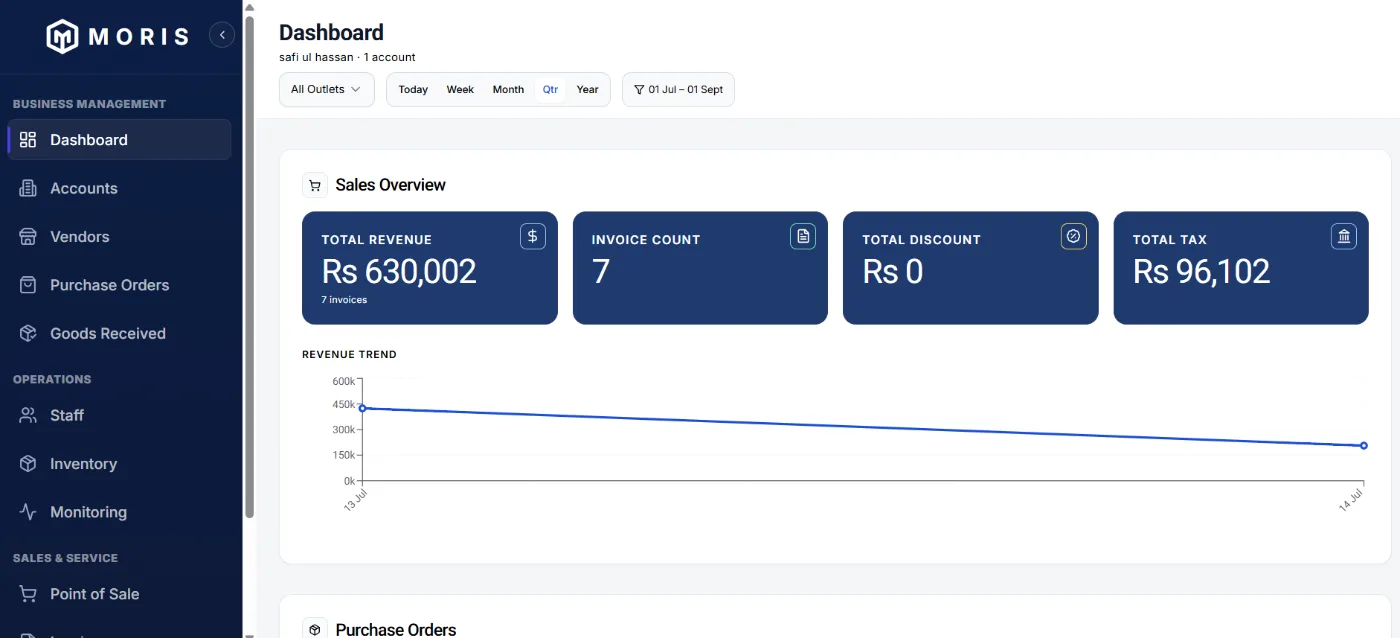
Dashboard
The Whole Business on One Screen.
The owner's overview, filterable by outlet and by period — daily, weekly, monthly, quarterly or yearly.
- Sales and revenue trend across any period
- Purchase orders on principals, foreign or local: in process, under delivery, closed
- Inventory and its serialization status
- Inventory aging at 30, 90 and 90+ days
- Sales turnover and product comparison, with revenue by category
- Repair tickets and their aging
- Login history of employees
Account management
Every Outlet Under You, Listed.
Hands-on information about the outlets operating under you, in one place.
- Outlets can run under the same business name or a different one — a business owner may buy another outlet and keep running it under its original name
- The province each outlet exists in, which is what determines its tax treatment
- If you have signed up for more than one account, you create your own accounts here — within the limit you signed up for
- Account status, including non-active where Moris dues are unpaid
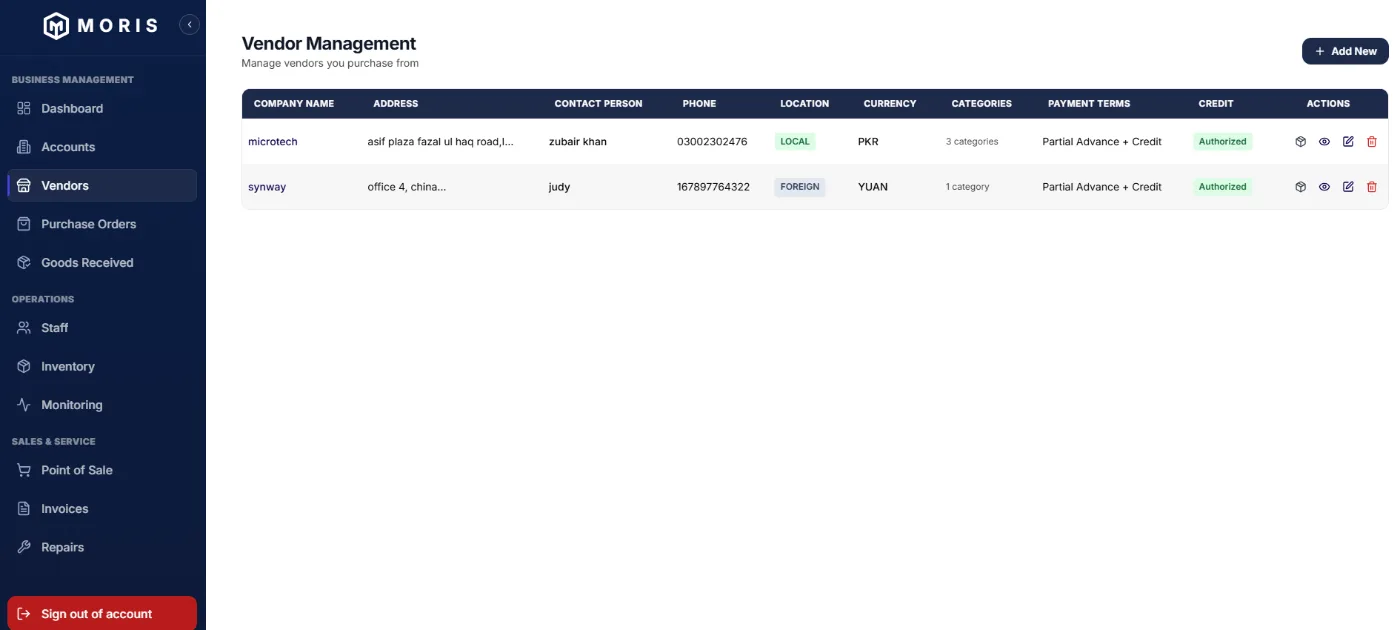
Vendors
Buy From Anyone, Local or Foreign.
Vendors are defined once — local distributors or foreign OEMs — with everything a purchase needs held against them.
- Contact person, address, location, currency, payment terms and credit status
- Product categories you signed up for are added against each vendor
- Product catalog per vendor, added item by item or bulk-uploaded using the Excel template provided — download it, fill it in as prescribed and upload
- Commercial terms and conditions described per vendor
- The same price list can be used again for repeat orders
Purchase orders
Every Rupee Tracked to a Part Number.
Purchase orders are raised against a vendor and built from that vendor's actual catalog — including from a walk-in customer selling you a used device.
- Selecting a part number auto-fills its unit buying price; you set quantity and the total computes
- Foreign vendors carry their own transaction currency and payment terms
- Draft → Approved → Goods Received, with payment status tracked separately
- Editable while in draft, then locked once pricing is confirmed
- On a foreign import, local duties and taxes incurred can be added and distributed across every item under the PO
- Once the actual landed cost is known, your profit margin goes on top to arrive at the local selling price
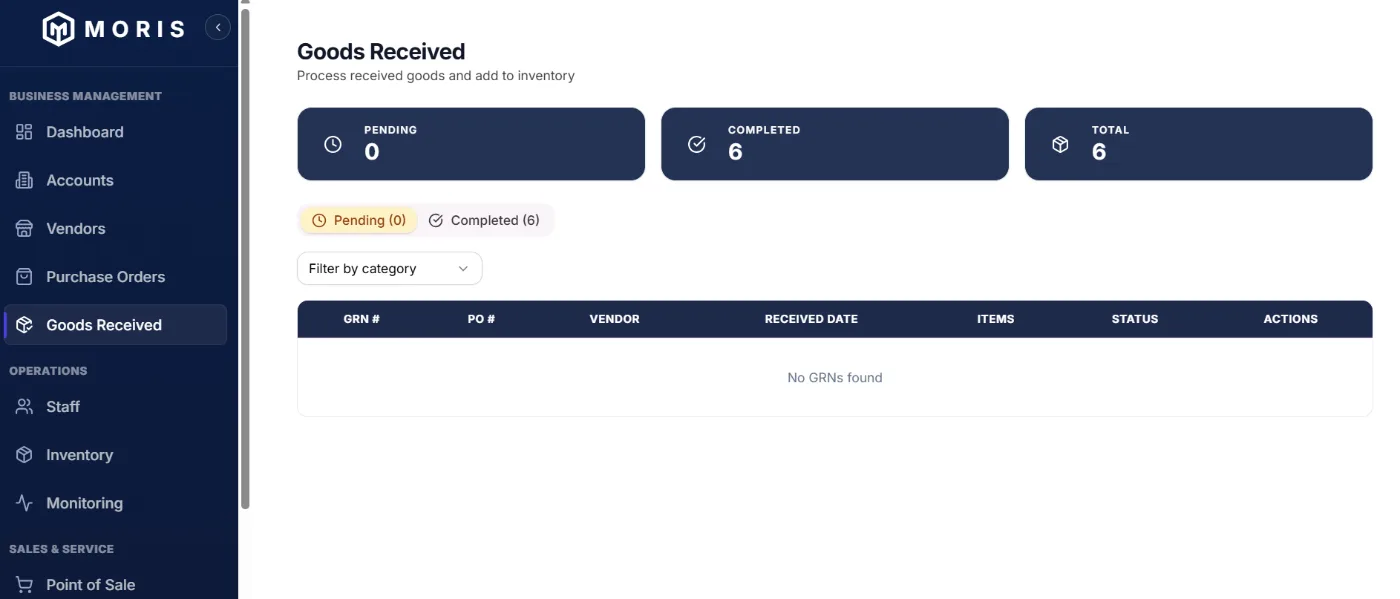
Goods received
Serialize on Arrival. Even Partial Deliveries.
Goods are received against the purchase order and each unit's serial number is recorded as it comes in.
- Serial numbers captured per unit at the point of receipt
- On a partial delivery, only what arrived is entered — the balance stays pending
- Partial deliveries surface on the dashboard so nothing is quietly forgotten
- Each receipt is a GRN against its PO, tracked as pending or completed and filterable by category
Operations
Staff
Your People, Their Roles, Their Rights.
Staff are entered per outlet, each with the role and access rights that role needs.
- Roles assigned per person — sales manager, salesperson, accounts, storekeeper, technician and so on — each with its own rights
- Personal details recorded against every staff member, and they stay on record even after an employee leaves
- Every employee registers with their own email ID, which is what makes individual performance traceable
- Filter by account and outlet to see exactly who is where
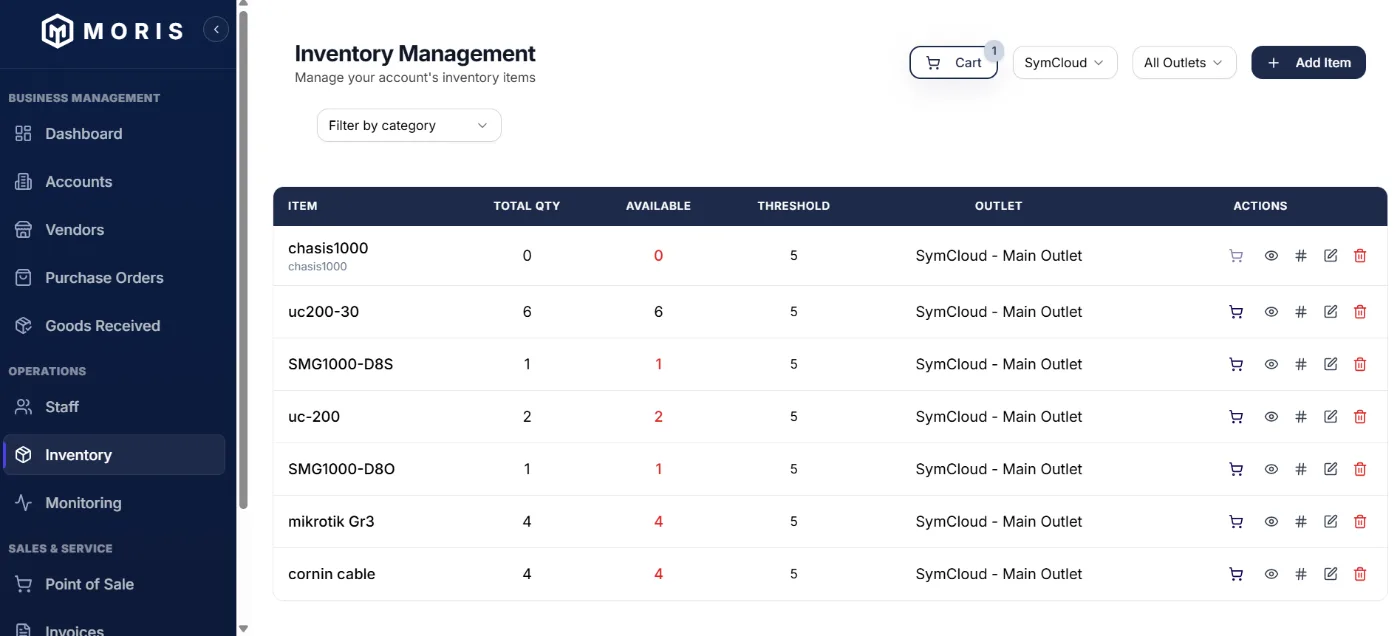
Inventory
Know Exactly What You Have.
Every unit is tracked by serial number, by outlet, with a threshold that flags an item before you run out of it.
- Total vs. available quantity, per item, per outlet
- Low-stock threshold raises a flag automatically — set your own, or leave it at the default of 5
- Flagged items go straight into a purchase cart
- Filter by category and by outlet, or monitor all outlets together
- Inventory aging shows what has been sitting at 30, 60, 90 and 180+ days
Monitoring
The Numbers You Actually Check Every Morning.
One screen for total inventory value, what is aging, what is faulty and what needs reordering.
- Value and quantity held in inventory, at a glance
- Low-stock and faulty item counts
- Used and brand-new stock segregated by status
- Aging distribution across <30, 30–90, 90–180 and 180+ days
- Recent low-stock alerts showing available vs. threshold and the outlet affected
- Separate tabs for aging, faulty items and alerts
Sales & service
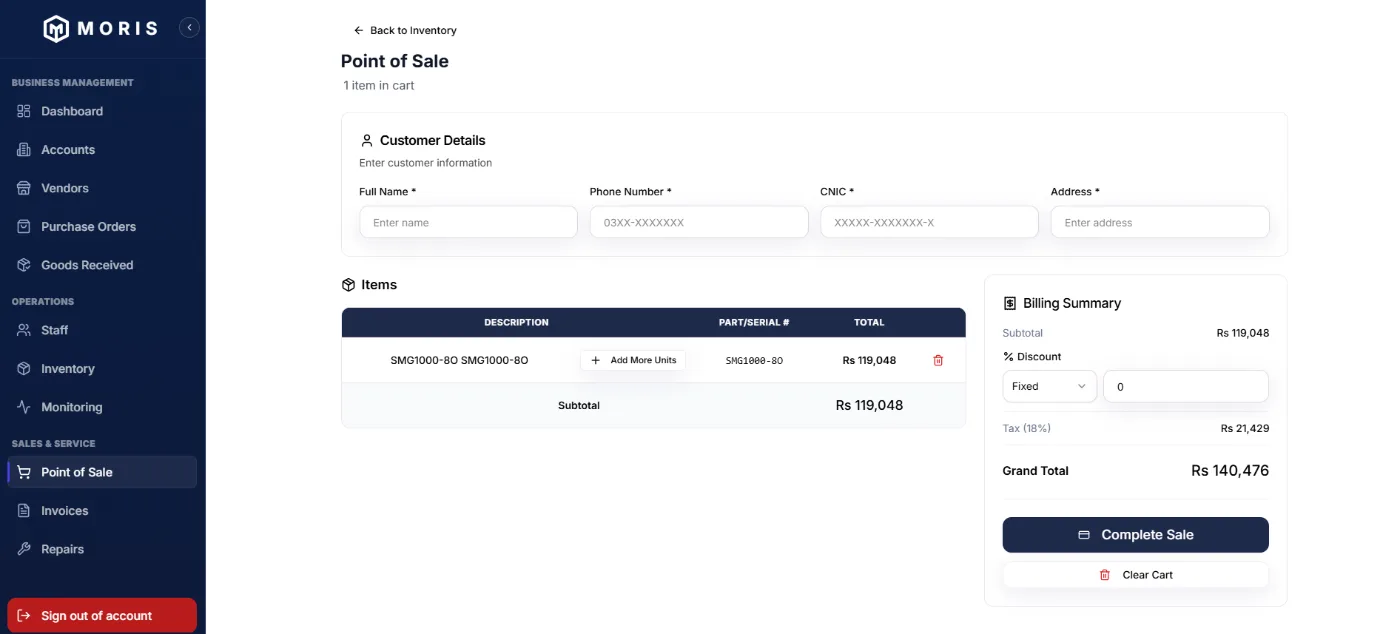
Point of sale
Sell at the Counter in Seconds.
Built for a walk-in customer standing in front of you — capture the sale, the customer and the tax in one screen.
- Customer name, phone, CNIC and address captured with the sale — mandatory on any mobile phone sale, new or used, and optional on other items
- Items added by part or serial number
- Fixed or percentage discount, within the limit the role permits
- Sales tax applied automatically at the outlet's provincial rate
Invoices & warranty
Every Sale Stays Findable.
When a customer walks back in months later, the serial number is all you need to pull up the whole history.
- Paid and unpaid invoices tracked together for reconciliation
- Filter by account and outlet; subtotal, discount, tax and total on every row
- Warranty position retrieved from the product and customer record, not a paper register
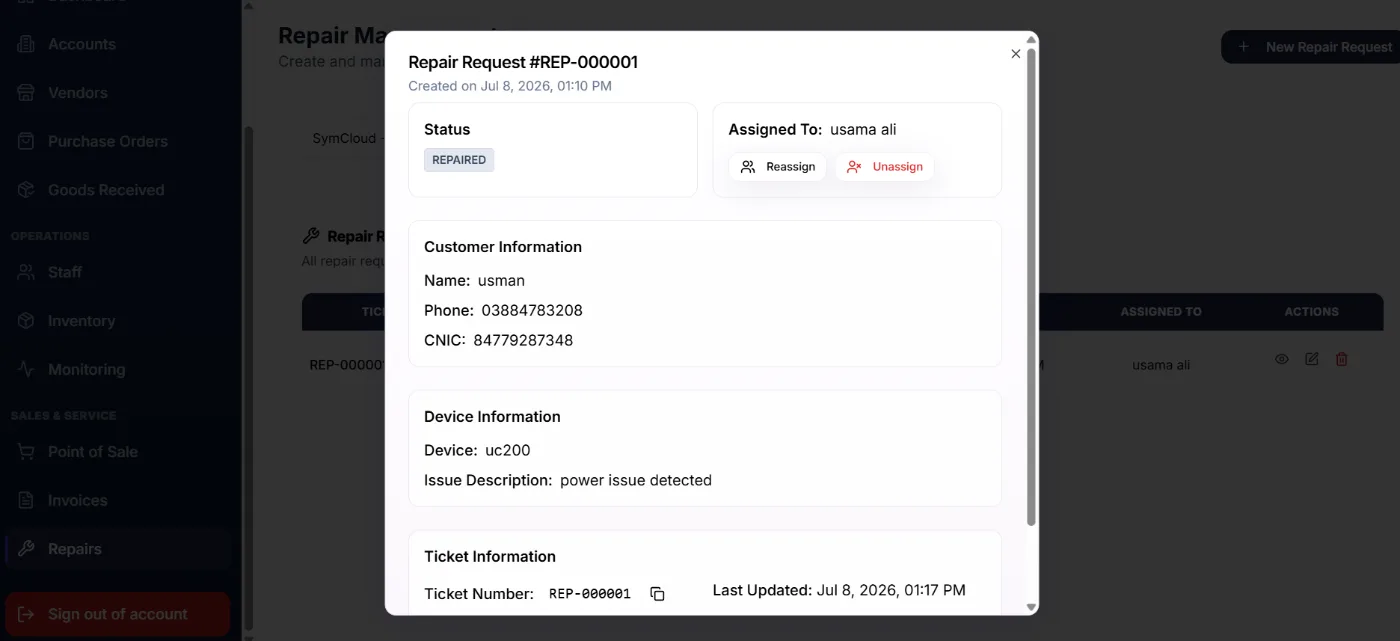
Repairs
No More "Let Me Check and Call You Back."
A customer complaint becomes a ticket, the ticket goes to a technician, and the status is visible to management and the customer alike.
- Customer, device and issue description recorded on the ticket
- Assigned to a technician, who only sees the jobs given to them
- Status updates from the technician become visible to management and the customer
- Assignment history supports tracking technician performance
No other inventory system in Pakistan does this
IMEI, PTA Approval and Stolen Device Alerts.
Mobile devices sold in Pakistan are tracked by IMEI and regulated by the Pakistan Telecommunication Authority. Moris checks against that reality automatically.
IMEI Tracking
Every mobile device sold is tracked by its IMEI number, tied directly to the sale and customer record.
PTA-Approved Verification
Only PTA-approved handsets are permitted to operate on local networks — Moris checks a device's IMEI against this before it's sold.
Stolen Device Alerts
Stolen-phone complaints are registered with the PTA, who instruct operators to block service. If a shop tries to buy or sell a phone reported stolen, Moris flags it automatically.
Multi-outlet & access control
One Business. Multiple Outlets. One View.
Outlets can sit in the same city or different provinces — tax applies per outlet's own location. The owner sees everything consolidated; everyone else sees only what their role permits.
Categories a business is allowed to deal in are permitted centrally, so an outlet cannot sell outside its authorized range.
Cloud-native, not installed
Your Business. Your Data. Accessible Anywhere.
Manage your business from your shop, another outlet or anywhere you have an internet connection.
✓ No server to maintain
✓ Access from anywhere
✓ Multiple outlets
✓ Multiple users
✓ Centralized data
✓ Automatic updates
✓ Scalable as the business grows
Seeing It Beats Reading About It.
Book a walkthrough and we'll show you the running product with your own kind of stock in it.